


Get NS0-593 Actual Free Exam Q&As to Prepare for Your Network Appliance Certification
Network Appliance Actual Free Exam Questions And Answers
The NS0-593 exam tests the candidate's knowledge on various topics such as ONTAP Security, High Availability, Data Protection, and Storage Efficiency. Candidates will be required to demonstrate their ability to install, configure, and troubleshoot NetApp ONTAP storage systems. They will also need to show their proficiency in using different tools to monitor and manage various aspects of the ONTAP storage environment.
The NS0-593 exam is one of the most sought-after certifications for support engineers who work with the NetApp ONTAP platform. NS0-593 exam covers a wide range of topics, including data protection, performance analysis, cluster management, and data storage. NS0-593 exam is designed to help engineers gain a comprehensive understanding of the ONTAP platform, which is used by many enterprises to manage their data storage and retrieval needs.
NEW QUESTION # 18
You recently discovered the error message shown below in your ONTAP logs.
What should be your first action to correct this Issue?
- A. Use the storage takeover command on the storage controller that contains my_data_vol.
- B. Power cycle all the disk storage shelves that contain drives of the aggregate with the my_data_vol volume.
- C. Determine the root cause behind the inconsistency before attempting any recovery procedure.
- D. Use the wafliron command against my_data_vol to solve the inconsistency on the volume.
Answer: C
Explanation:
= The error message indicates that the volume my_data_vol is WAFL inconsistent, which means that there is a discrepancy between the data blocks and the metadata in the file system. This can be caused by various factors, such as hardware failures, software bugs, power outages, or network disruptions. The first action to correct this issue is to determine the root cause behind the inconsistency before attempting any recovery procedure, as recommended by the NetApp documentation1. This is because some recovery procedures, such as wafliron or storage takeover, may not work or may cause further damage if the underlying cause is not resolved. For example, if the inconsistency is due to a faulty disk or shelf, running wafliron may not fix the problem and may even corrupt more data. Therefore, it is important to identify and isolate the cause of the inconsistency before taking any further steps. Reference = 1 Volume Showing WAFL Inconsistent - NetApp Knowledge Base
NEW QUESTION # 19
You are optimizing your Cloud Volumes ONTAP. For interoperability and consolidation purposes, you need
to know the storagelimits.
In this scenario, which source should be reviewed?
- A. Cloud Central
- B. Interoperability Matrix Tool (IMT)
- C. NetApp Cloud Volumes ONTAP Release Notes
- D. Hardware Universe
Answer: C
NEW QUESTION # 20
You have a customer complaining of long build times from their NetApp ONTAP-based datastores. They provided you packet traces from the controller and client. Analysis of these traces shows an average service response time of 1 ms. QoS output confirms the same. The client traces are reporting an average of 15 ms in the same time period.
In this situation, what would be your next step?
- A. The cluster is responding slowly and requires further investigation using performance archives.
- B. A sync core should be triggered.
- C. The client that reports high latency should be investigated.
- D. The cluster interconnects should be investigated.
Answer: C
Explanation:
The question describes a scenario where the controller and client have a significant difference in their reported latency for the same datastores.
The controller's latency is 1 ms, which is within the normal range for ONTAP-based datastores1.
The client's latency is 15 ms, which is much higher than the controller's latency and could indicate a performance issue on the client side2.
Therefore, the next step is to investigate the client that reports high latency and identify the possible causes, such as network congestion, misconfiguration, resource contention, or application issues23.
The other options are not relevant or appropriate for this scenario, because:
A) The cluster is not responding slowly, as the controller's latency is low and QoS output confirms the same.
C) The cluster interconnects are not likely to be the cause of the latency difference, as they are used for communication between nodes within the cluster, not between the controller and the client4.
D) A sync core is a diagnostic tool that captures the state of the system at a given point in time, and is not a troubleshooting step for performance issues5. Reference:
ONTAP 9 Performance - Resolution Guide - NetApp Knowledge Base
Performance troubleshooting - NetApp
How to troubleshoot performance issues in Data ONTAP 8 7-mode
Cluster interconnect network - NetApp
How to generate a sync core on a node - NetApp
NEW QUESTION # 21
You created a new NetApp ONTAP FlexGroup volume spanning six nodes and 12 aggregates with a total size of 4 TB. You added millions of files to the FlexGroup volume with a flat directory structure totaling 2 TB, and you receive an out of apace error message on your host.
What would cause this error?
- A. The maximum number of volume constituents has been reached in the ONTAP software.
- B. All constituent volumes are full.
- C. The maxdirsize Is exceeded in the ONTAP software.
- D. The inode limit is exceeded in the ONTAP software.
Answer: C
Explanation:
The maxdirsize is the maximum size of a directory in a FlexVol or FlexGroup volume. It is determined by the number of inodes allocated to the directory. If the directory contains more files than the maxdirsize can accommodate, then the ONTAP software will return an out of space error message to the host, even if the volume has enough free space. This can happen when a FlexGroup volume has a flat directory structure with millions of files, as the maxdirsize is not automatically adjusted for FlexGroup volumes12. Reference: 1: FlexGroup volumes: Frequently asked questions | NetApp Documentation 2: How to increase the maxdirsize of a FlexVol volume - NetApp Knowledge Base
NEW QUESTION # 22
You are attempting to connect a NetApp ONTAP cluster to a very complex network that requires LIFs to fail
over across subnets.
How would youaccomplish this task?
- A. Configure VIP LIFs using BGP.
- B. Configure an equal number of UFs on each subnet.
- C. Configure VIP LIFs using OSPF.
- D. Configure a I IF failover policy for each subnet inside a single broadcast domain.
Answer: A
NEW QUESTION # 23
A customer calls you to troubleshoot a network issue. The customer wants to create a packet trace for allclients
on the 192.168.9.0/24 subnet.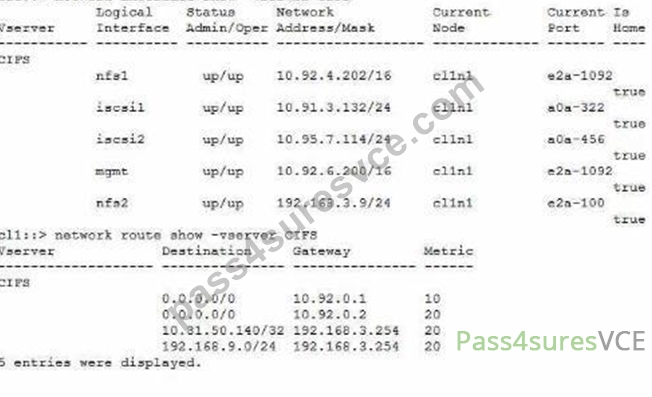
Referring to the exhibit, on which interface do you have to run the packet trace?
- A. e2a-100
- B. e2a-1092
- C. a0a-322
- D. a0a-456
Answer: B
NEW QUESTION # 24
After expanding a two-node AFF A300 cluster with two AFF A700 nodes, you observe latencies when data is
accessed indirectly. The system node run -node -command netstat command shows retransmits and packet
drops on the LIFs. The AFF A700 nodes with 40 Gbps and the AFF A300 connect with 10 Gbps to the cluster
interconnect. You are using Cisco Nexus 3132Q cluster interconnect switches. You just updated to ONTAP
9.8 software.
In this scenario, what is causing this problem?
- A. There is an NXOS firmware mismatch, verify in the Interoperability Matrix (1MTJ for a supportedversion.
- B. The 10 Gbps to 10 Gbps cluster Interconnect is creating a speed mismatch.
- C. AFF A300 and AFF A700 node mixing Isnot supported in ONTAP 9.8 software.
- D. The AFF A300 Is using an adapter card for the cluster Interconnect, but only onboard ports are supported.
Answer: B
NEW QUESTION # 25
A user reports that a colleague saved a file called Test.txt from a UNIX system to a multiprotocol volume. When opening the file later from a Windows system, it was not the file that they wanted. The file that they wanted was named TEST~1.TXT.
Which statement explains this behavior?
- A. Windows Volume Shadow Copy Service stored an older version of the file.
- B. A Snapshot copy preserved two versions of the file.
- C. Case Insensitivity of SMB clients caused the file to be displayed with a different name.
- D. UNIX name mapping updated the filename.
Answer: C
Explanation:
= The multiprotocol volume allows clients to access files using both NFS and SMB protocols. The NFS protocol is case-sensitive, meaning that Test.txt and TEST~1.TXT are two different files. The SMB protocol is case-insensitive, meaning that it treats uppercase and lowercase letters as the same when searching for a file. Therefore, when the user opened the file from a Windows system using SMB, the system could not distinguish between Test.txt and TEST~1.TXT and displayed one of them arbitrarily. This could lead to confusion and data loss if the user modified or deleted the wrong file. Reference = Client protocols; Multiprotocol NAS in NetApp ONTAP Overview and Best Practices, page 30-31.
NEW QUESTION # 26
Recently, a CIFS SVM was deployed and is working. The customer wants to use the Dynamic DNS(DDNS)
capability available in NetApp ONTAP to easily advertise both data UFs to their clients. Currently. DNS is
only responding with one data LIF. DDNS is enabled on the domain controllers.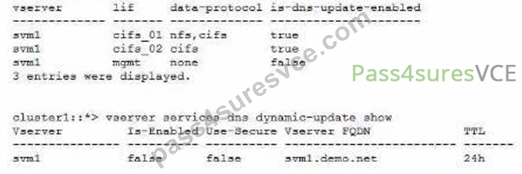
Referring to the exhibit, which two actions should be performed to enable DDNS updates to work? (Choose
two.)
- A. Disable the -vserver-fqdn parameter for the SVM DDNS services.
- B. Enable the -is-enabledparameter for the SVM DDNS services
- C. Enable the -use-secure parameter for the SVM DDNS services.
- D. Remove the NFS protocol from the cifs_01 data LIF.
Answer: A,B
NEW QUESTION # 27
Refer to the exhibit.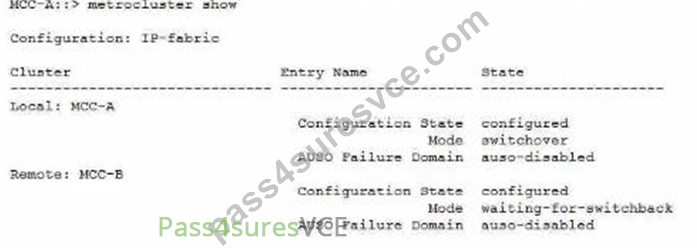
Referring to the exhibit, what do you need to do to return the MetroCluster to a normal state?
- A. Enter the metroclustor switchback command on Site B.
- B. Enter the metrocluster switchback command on Site A.
- C. Enter the storage failover giveback command on Site B.
- D. Enter the storage failover giveback command on Site A.
Answer: B
Explanation:
The question refers to a MetroCluster configuration, which is a disaster recovery solution that uses two physically separated, mirrored clusters1.
The exhibit shows a MetroCluster switchover scenario, where Site A has experienced a disaster and Site B has taken over the tasks of Site A2.
To return the MetroCluster to a normal state, you need to perform a MetroCluster switchback operation, which reverses the switchover and activates the original sync-source storage virtual machines (SVMs) on Site A3.
To perform a MetroCluster switchback, you need to enter the metrocluster switchback command on the cluster that was the source of the switchover, which is Site A in this case3.
The other options are not correct, because:
A) Entering the metrocluster switchback command on Site B will not work, as Site B is the destination of the switchover, not the source3.
C) Entering the storage failover giveback command on Site B will not work, as this command is used for local HA failover within a cluster, not for MetroCluster switchover between clusters4.
D) Entering the storage failover giveback command on Site A will not work, as this command is used for local HA failover within a cluster, not for MetroCluster switchover between clusters4. Reference:
Understanding MetroCluster data protection and disaster recovery - NetApp Perform IP MetroCluster switchover and switchback - NetApp Performing a switchback - NetApp High-availability configuration - NetApp
NEW QUESTION # 28
You have recently discovered that NetApp ONTAP Cloud Manager is not sending AutoSupport messages to NetApp.
In this scenario, what would solve this Issue?
- A. Verify that your NetApp Support site credentials are correctly added to Cloud Manager.
- B. Verify that your AWS credentials are correctly added to Cloud Manager.
- C. Verify that your data LIFs allow traffic to mysupport .netapp.com on port 443.
- D. Verify that the inbound and outbound rules allow AutoSupport on port 80.
Answer: A
Explanation:
= AutoSupport is enabled by default for Cloud Manager and ONTAP Cloud systems. It proactively monitors the health of your systems and sends messages to NetApp technical support. To enable AutoSupport, you must provide your NetApp Support site credentials to Cloud Manager. If your credentials are incorrect or expired, Cloud Manager will not be able to send AutoSupport messages to NetApp. Therefore, the solution for this issue is to verify that your NetApp Support site credentials are correctly added to Cloud Manager. Reference = Troubleshooting Cloud Manager and ONTAP Cloud, Set up AutoSupport
NEW QUESTION # 29
Recently, a CIFS SVM was deployed and is working. The customer wants to use the Dynamic DNS (DDNS) capability available in NetApp ONTAP to easily advertise both data UFs to their clients. Currently. DNS is only responding with one data LIF. DDNS is enabled on the domain controllers.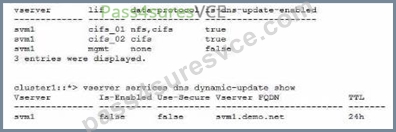
Referring to the exhibit, which two actions should be performed to enable DDNS updates to work? (Choose two.)
- A. Disable the -vserver-fqdn parameter for the SVM DDNS services.
- B. Enable the -use-secure parameter for the SVM DDNS services.
- C. Enable the -is-enabled parameter for the SVM DDNS services
- D. Remove the NFS protocol from the cifs_01 data LIF.
Answer: C,D
Explanation:
To enable DDNS updates to work, two actions should be performed:
Remove the NFS protocol from the cifs_01 data LIF. This is because DDNS updates are only supported for LIFs that have only one data protocol enabled1. The cifs_01 LIF has both NFS and CIFS protocols enabled, which prevents it from registering its DNS record dynamically. By removing the NFS protocol from the cifs_01 LIF, it will become eligible for DDNS updates.
Enable the -is-enabled parameter for the SVM DDNS services. This is because the -is-enabled parameter controls whether the SVM sends DDNS updates to the DNS servers2. The exhibit shows that the -is-enabled parameter is set to false for the svm1 SVM, which means that it does not send any DDNS updates. By enabling the -is-enabled parameter, the SVM will start sending DDNS updates for its eligible LIFs. Reference:
1: Configure dynamic DNS services3
2: Manage DNS/DDNS services with System Manager4
NEW QUESTION # 30
You are troubleshooting a CIFS connection issue that is reported by some users. You decide to collect a packet
trace.
In this scenario, after you generate the packet trace, where do you find the trace file?
- A. /packet_traces of the node hosting the LIF
- B. /etc/log/packet_traces of the node hosting the LIF
- C. /vol0/paclcet_traces of the CIFS SVM
- D. /etc/log/mlog/packet._traces Of all nodes
Answer: D
NEW QUESTION # 31
You have a NetApp ONTAP cluster consisting of four NetApp FAS8200 controllers with two NetApp CN1610 cluster switches running ONIAP 9.8 software. You are receiving several alert messages stating that the cluster network has degraded. After troubleshooting, you determine that the errors are being generated from Node 2, interface e0b.
In this scenario, what should you do first to solve this problem?
- A. Replace the motherboard on Node 2.
- B. Replace both NetApp CN1610 switches.
- C. Replace the NetApp CN1610 switch that connects to Node 2, interface e0b.
- D. Replace the Twinax cable between Node 2, Interface e0b. and the NetApp CN1610 switch.
Answer: D
Explanation:
A Twinax cable is a type of copper cable that is used to connect cluster ports to cluster switches1.
A cluster port is a network port that is configured for cluster communication and data access2.
A cluster switch is a network switch that is used to interconnect the nodes in a cluster and provide redundancy and load balancing3.
A cluster network is a network that enables cluster communication and data access between the nodes in a cluster and external clients4.
A cluster network can be degraded due to various reasons, such as misconfiguration, malfunction, or excessive link errors on the cluster ports or the cluster switches.
Link errors are errors that occur on the physical layer of the network, such as CRC errors, length errors, alignment errors, or dropped packets.
Link errors can indicate a problem with the cable, the switch port, the network interface card (NIC), or the cable connector.
In this scenario, the alert messages state that the cluster network has degraded and the errors are being generated from Node 2, interface e0b.
The first step to solve this problem is to replace the Twinax cable between Node 2, interface e0b and the NetApp CN1610 switch, as this could be the source of the link errors.
Replacing the cable could resolve the issue and restore the cluster network to a healthy state.
If replacing the cable does not solve the problem, then other steps may be required, such as checking the switch port, the NIC, or the cable connector, or replacing the switch or the motherboard. Reference:
1: Cluster network cabling, ONTAP 9 Documentation Center
2: Cluster ports, ONTAP 9 Documentation Center
3: Cluster switches, ONTAP 9 Documentation Center
4: Cluster network, ONTAP 9 Documentation Center
[5]: How to troubleshoot CLUSTER NETWORK DEGRADED error messages, NetApp Knowledge Base
[6]: Cluster network degraded due to high CRC errors on cluster ports, NetApp Knowledge Base
NEW QUESTION # 32
You have a 4-node NetApp ONTAP 9.8 cluster with an AFF A400 HA pair and a FAS8300 HA pair with 16 TB NL-SAS drives. You are asked to automatically tier 150 TB of Snapshot copy data from the AFF A400 aggregates to the FAS8300.
In this scenario, which ONTAP license must be added to the cluster to accomplish this task?
- A. VE license
- B. S3 license
- C. TPM license
- D. FabricPool license
Answer: D
NEW QUESTION # 33
A customer reports that some of their client computers are unable to access a FlexGroup over CIFS. This
problem involves only their older Windows XP clients and some printers and scanners.
In this scenario, which statement Is correct?
- A. FlexGroup requires CIFS shares to use the Continuously Available Feature, which these clients do not
support. - B. These systems use Offloaded Data Transfer, which is an unsupported feature in FlexGroup.
- C. These systems use the SMQI protocol which Is an unsupported feature in FlexGroup
- D. FlexGroup requires CIFS shares to be located in qtrees, which these clients do not support.
Answer: A
NEW QUESTION # 34
Your customer Informs you about SnapMlrror problems after upgrading NetApp ONTAP software to a newer
version. After investigating the event logs and the SnapMirror history, you see information about delayed
updates of the SnapMirror relationships.
How would your customer prevent such problems in the future?
- A. Quiesce the SnapMirror relationships before upgrading the ONTAP software.
- B. Verify that the cabling of the hardware port that Is responsible for SnapMirror transfers Is correct.
- C. Modify the schedules of the SnapMirror relationships after upgrading the ONTAP software.
- D. Delete the SnapMirror relationships and create them new after upgrading the ONTAP software.
Answer: B
NEW QUESTION # 35
Your customer installed the shelf firmware for their NS224 shelf over a week ago, and the firmware has
notupgraded on shelf 1 module B. The customer wants to know what the next steps would be to get the
firmware upgraded after verifying that the shelf firmware is indeed loaded onto the system.
Which step would you perform to complete the firmware upgrade?
- A. Reseat the NSM100 module.
- B. Reseat the disk in Bay 0.
- C. Reseat the PSU of the shelf.
- D. Power cycle the shelf.
Answer: D
NEW QUESTION # 36
Your customer wants to access a LUN on a FAS 8300 system from a VMware ESXi server through the FC protocol. They already created a new SVM, volume. LUN, and igroup for this purpose. The customer reports that the server's FC HBA port Is online, but the LUN does not show up.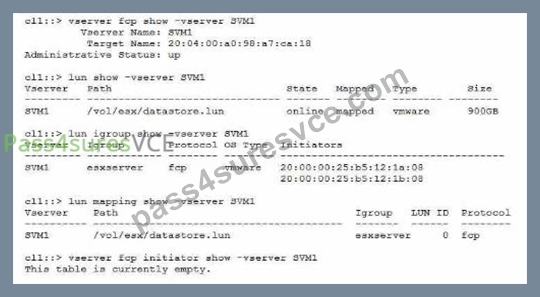
Referring to the exhibit, what is the reason for this problem?
- A. The LUN Is not mapped to the correct SCSI ID.
- B. The FC service has not been configured on the SVM.
- C. The esxserver igroup contains incorrect IQNs.
- D. The zoning on the FC switches Is Incorrect.
Answer: B
Explanation:
To access a LUN on a FAS 8300 system from a VMware ESXi server through the FC protocol, the customer must configure the FC service on the SVM that owns the LUN. The FC service enables the SVM to act as an FC target and communicate with the FC initiators on the host. Without the FC service, the LUN will not be visible to the host, even if the LUN is mapped to an igroup and the FC LIFs are up. The exhibit shows that the FC service is not configured on the SVM, as the output of the command vserver fcp initiator show -vserver SVM1 is empty. Therefore, the reason for the problem is that the FC service has not been configured on the SVM. Reference = Configure an SVM for FC, Create an FC protocol service, Single IQN iSCSI session with ESXi on ONTAP when igroup has two IQNs
NEW QUESTION # 37
A customer wants to connect a NetApp AFF A700 system to a 40GbE switch. The controllers have a 10/40G Ethernet card in slot 4 for this purpose. The link comes up fine on node 2, but it will not come up on node 1. You look at the AutoSupport data for the nodes in question and see the output shown in the exhibit.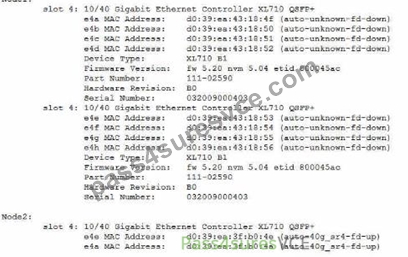
What is the cause of the customer's problem?
- A. The ports are configured for 4x10Gbit instead of 40Gbit.
- B. The incorrect cable is used.
- C. The port has an incorrect SFP inserted.
- D. The cable is plugged in upside down.
Answer: C
Explanation:
= The cause of the customer's problem is that the port has an incorrect SFP inserted. According to the AutoSupport data, the node 1 has a device type of XL710 BQ, which is a 40GbE adapter that requires a QSFP+ transceiver1. However, the part number of the adapter is 111-02590, which is a 10GbE adapter that requires a SFP+ transceiver2. This mismatch prevents the link from coming up on node 1. The customer should replace the adapter with the correct one or use a compatible transceiver for the existing adapter. Reference = 1: NetApp Hardware Universe - X1144A 2: NetApp Hardware Universe - X1147A
NEW QUESTION # 38
The motherboard of Node-01 is being replaced. To perform this task, a takeover was Initiated from Node-02. Node-02 panics showing the string below.
PANIC; Permanent errors on all HA mailbox disks (while marshalling header) in SKprocess fnmbx_instanceWorker on release 9.5P8 (C) What has happened in this situation?
- A. While in maintenance mode, the HA_config show command was executed.
- B. While in maintenance mode, the fcadmin device_map command was executed.
- C. While in maintenance mode, the mailbox destroy local command was executed.
- D. While in maintenance mode, the sldiag device show command was executed.
Answer: C
Explanation:
The mailbox disks are the first two disks of the root aggregate on each node of an HA pair. They store the HA state information and the panic dump files. The mailbox disks are used for communication between the HA partners and for takeover and giveback operations1 The mailbox destroy local command is used to destroy the mailbox disks on the local node. This command is only available in maintenance mode and should be used with extreme caution. The command is intended for situations where the mailbox disks are corrupted or inaccessible and need to be recreated2 If the mailbox destroy local command is executed on a node that is in takeover mode, the node will panic with the message "Permanent errors on all HA mailbox disks". This is because the node will lose the HA state information and the panic dump files of the partner node, and will not be able to communicate with the partner node or perform a giveback operation3 Therefore, if the motherboard of Node-01 is being replaced, and a takeover was initiated from Node-02, and Node-02 panics showing the string "Permanent errors on all HA mailbox disks", the most likely cause is that the mailbox destroy local command was executed on Node-02 while in maintenance mode. This is a serious error that can result in data loss and system downtime4 Reference:
1: ONTAP 9 - High-Availability Configuration Guide - The Open Group 2: ONTAP 9 - Commands: Manual Page Reference - The Open Group 3: How to troubleshoot a "Permanent errors on all HA mailbox disks" panic - NetApp Knowledge Base 4: One node PANIC : Permanent errors on all HA mailbox disks - NetApp Knowledge Base
NEW QUESTION # 39
A customer enabled NFSv4.0on an SVM and changed the client mount from NFSv3 to NFSv4. Afterwards,
the customer found that the directory owner was changed from root to nobody.
In this scenario, which statement is true?
- A. The export policy is not configured properly.
- B. The clients must be restarted to start using NFSv4.
- C. The ID mapping domains do not match between the client and server.
- D. The customer did not configure name services on the SVM.
Answer: A
NEW QUESTION # 40
An administrator receives the following error message:
What are two causes for this error? (Choose two.)
- A. An SSD disk is performing garbage collection to create a dense data layout.
- B. There is excessive SATA HDD load.
- C. There Is excessive SSD load causing the wear leveling to become unbalanced.
- D. A disk is falling.
Answer: B,C
NEW QUESTION # 41
A customer wants to connect a NetApp AFF A700 system to a 40GbE switch. The controllers have a 10/40G
Ethernet card in slot 4 for this purpose. The link comes up fine on node 2,but it will not come up on node 1.
You look at the AutoSupport data for the nodes in question and see the output shown in the exhibit.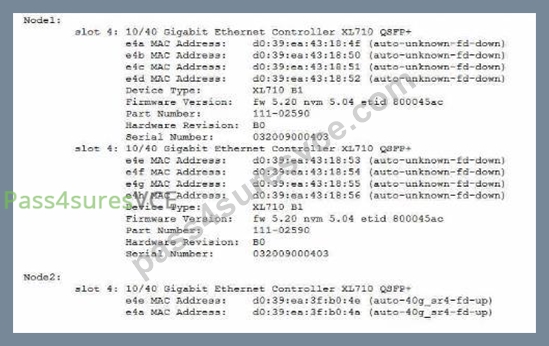
What is the cause of the customer's problem?
- A. The ports are configured for 4x10Gbit instead of 40Gbit.
- B. The incorrect cable is used.
- C. The port has an incorrect SFP inserted.
- D. The cable is plugged in upside down.
Answer: A
NEW QUESTION # 42
......
NS0-593 Questions Truly Valid For Your Network Appliance Exam: https://www.pass4suresvce.com/NS0-593-pass4sure-vce-dumps.html
NS0-593 Actual Questions - Instant Download Tests Free Updated Today!: https://drive.google.com/open?id=1OX1xn1aGRpKSLB1wbIxr9aqrNPU53u-K